Tapped, Tricked, Infected: How Push Notifications Became a Prime Vector for Cyberattacks
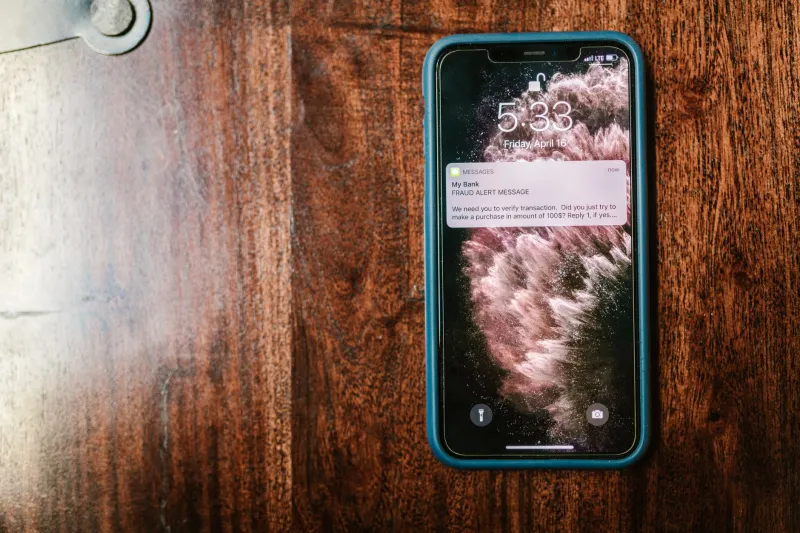
At first glance, a push notification seems harmless — a brief message from your bank, a delivery update, a news headline. But security researchers and federal law enforcement agencies have documented a growing pattern: threat actors are systematically exploiting the notification infrastructure that millions of Americans interact with dozens of times each day. What was engineered to inform is now being turned against users with increasing sophistication.
The Anatomy of a Notification Attack
Push notifications operate through a centralized brokerage system. On Apple devices, this runs through Apple Push Notification Service (APNs); on Android, it flows through Google's Firebase Cloud Messaging (FCM). Legitimate apps register with these services to deliver timely alerts to users. The problem is that bad actors have learned to mimic, subvert, and in some cases directly exploit these channels.
There are three primary attack vectors security professionals have identified:
Browser-based notification hijacking is currently the most widespread. When a user visits a website — often one encountered through a misdirected search result or a shortened link shared on social media — a prompt appears requesting permission to send notifications. Once granted, that site can push alerts indefinitely, even when the browser is closed. These alerts are visually indistinguishable from legitimate system notifications and frequently contain links to phishing pages, fraudulent tech-support schemes, or drive-by download sites.
Notification spoofing through malicious apps represents a more targeted approach. Apps that bypass app store vetting — either through sideloading on Android or through developer enterprise certificates on iOS — can generate fake system-level alerts that impersonate trusted applications. A spoofed alert appearing to originate from a banking app, for instance, might prompt a user to "verify their identity" through a link that harvests credentials.
Compromised legitimate apps form the third category. In documented cases — including a 2022 campaign analyzed by researchers at Lookout Security — threat actors embedded notification-triggering malware into apps that had previously passed standard review processes. These apps, once installed, could receive remote commands to push alerts containing malicious payloads.
Real-World Cases That Illustrate the Threat
The FBI's Internet Crime Complaint Center (IC3) has flagged browser notification abuse as a contributing mechanism in multiple large-scale phishing campaigns targeting American consumers. In one notable operation, fraudsters used deceptive news aggregator sites to harvest notification permissions from thousands of users across the US. Those users subsequently received alerts that appeared to originate from the IRS and major financial institutions, directing them to convincing credential-harvesting portals.
In 2023, cybersecurity firm Malwarebytes documented a campaign it dubbed "NotifyStealer," in which malicious browser extensions were distributed through third-party extension repositories. Once installed, these extensions intercepted legitimate notifications from banking and e-commerce sites, replacing benign alert content with fraudulent messages containing embedded phishing URLs. Victims reported financial losses before the campaign was disrupted.
Separately, researchers at Zimperium identified Android malware families — including variants of the Joker spyware lineage — that specifically targeted the notification listener permissions in Android's accessibility framework. By obtaining these permissions, the malware could silently read incoming notifications, extract one-time passwords delivered via SMS or app alerts, and relay them to command-and-control servers operated by the threat actors.
Why This Attack Surface Is Expanding
Several converging factors have made push notifications an increasingly attractive target. First, user trust in notifications remains disproportionately high. Studies in behavioral cybersecurity consistently show that individuals are more likely to act on a notification prompt than on an email with equivalent content, largely because notifications feel immediate and authoritative.
Second, the permission model for browser notifications is poorly understood by most users. Many people click "Allow" reflexively when prompted, without recognizing that they have just granted an unknown website persistent access to their notification stream.
Third, the sheer volume of legitimate notifications users receive daily creates a cognitive environment in which scrutinizing each alert becomes impractical. Threat actors exploit this fatigue deliberately, timing malicious notifications to appear during periods of high alert activity — during business hours, around tax season, or following high-profile data breach announcements that generate public anxiety.
Practical Steps to Protect Yourself
The good news is that this attack surface is largely manageable with deliberate configuration changes and heightened awareness.
Audit your browser notification permissions immediately. In Google Chrome, navigate to Settings > Privacy and Security > Site Settings > Notifications. In Firefox, access this through Settings > Privacy & Security > Permissions. Review every site that has been granted notification access. Revoke permissions for any source you do not recognize or actively use. For most users, the list will contain several entries they have no memory of approving.
Set your default notification permission to "Ask" or "Block." Both Chrome and Firefox allow users to prevent sites from requesting notification permissions entirely. Enabling this setting eliminates the most common browser-based notification attack vector before it can be initiated.
Treat unsolicited notifications with the same skepticism you apply to unsolicited emails. If a notification appears to come from your bank, your package carrier, or a government agency and contains a link, navigate to that institution's official site directly rather than tapping the notification. Legitimate organizations do not require you to click an alert to resolve account issues.
Review app notification permissions on your mobile device. On iOS, go to Settings > Notifications and examine which apps have permission to display alerts. On Android, navigate to Settings > Apps and review notification access for each installed application. Pay particular attention to apps that request notification listener access — a permission that allows an app to read notifications generated by other apps. This permission has legitimate uses in smartwatch companion apps and accessibility tools, but it is frequently abused by malicious software.
Keep your browser and operating system updated. Many notification-based exploits rely on vulnerabilities that have been patched in current software versions. Deferred updates leave known attack surfaces open longer than necessary.
Use a reputable security suite with real-time web protection. Several major security vendors — including Malwarebytes, Bitdefender, and Norton — offer browser extensions and mobile applications that flag known malicious notification sources and phishing domains before a user can interact with them.
A Feature Turned Weapon
The notification trap is a textbook example of how cybercriminals adapt to the digital behaviors of ordinary users. As Americans have grown accustomed to managing their lives through a constant stream of device alerts, threat actors have positioned themselves inside that stream. The vulnerability is not purely technical — it is behavioral. Recognizing that a notification is not inherently trustworthy, regardless of how official it appears, is the foundational shift in mindset that security professionals argue is most urgently needed.
The infrastructure that powers push notifications is not going away, and neither is the criminal ingenuity directed at exploiting it. What users can control is the access they grant, the skepticism they apply, and the speed with which they act on an alert that arrives uninvited.