Buzz, Tap, Compromised: How Criminals Have Turned Push Notifications Into a Phishing Weapon
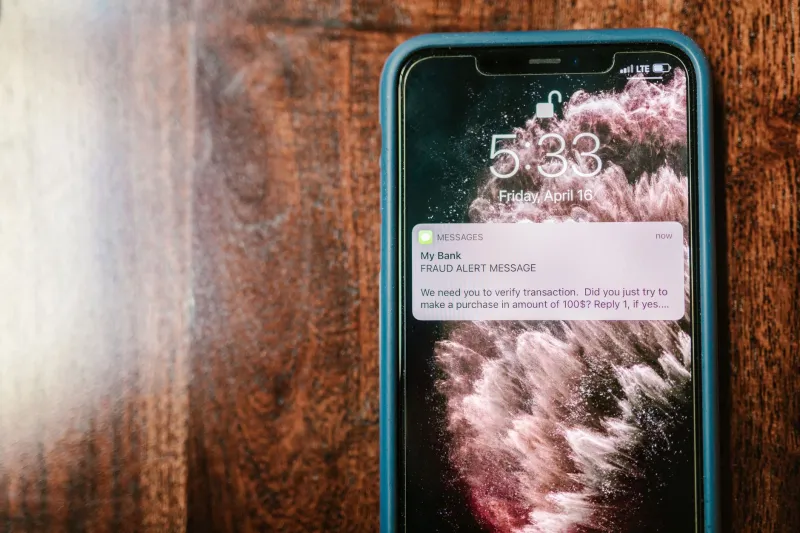
There is a moment — familiar to virtually every smartphone owner — when a notification appears and the hand moves toward the screen almost before the mind has registered what it says. That reflex, trained over years of legitimate alerts from banks, employers, and delivery services, has become one of the most reliably exploited vulnerabilities in modern cybersecurity. Threat actors have identified it, studied it, and built entire attack campaigns around it.
Push notifications are no longer just a convenience feature. In the wrong hands, they are a precision instrument for credential theft, financial fraud, and malware delivery — and the average American user has almost no idea the threat exists.
The Architecture of Trust That Attackers Exploit
To understand why notification-based attacks work so consistently, it helps to consider what a push alert communicates before a single word is read. It arrives in a privileged space — the lock screen or notification tray — that users associate with verified, installed applications. It carries an app icon, often a recognizable logo. It interrupts whatever the user is doing. All of these signals, in legitimate contexts, are markers of authenticity.
Attackers replicate those signals with considerable precision. A malicious app distributed through third-party app stores, or occasionally slipping through official marketplace reviews, can generate notifications that are visually indistinguishable from those produced by a genuine banking application. The alert reads: Unusual sign-in detected. Tap to verify your identity. The user taps. The resulting screen — designed to mirror the bank's actual login interface — harvests whatever credentials are entered and transmits them to a remote server.
This is not a hypothetical scenario. Security researchers at multiple firms have documented campaigns in which fraudulent finance and utility applications generated millions of push alerts before being identified and removed.
Browser Notification Abuse: The Web-Based Variant
While app-based notification fraud requires a malicious installation, a parallel attack vector requires nothing more than a browser visit. Web Push Notifications — the system that allows websites to send alerts to a desktop or mobile browser even when the site is not open — have been systematically abused since the feature became widely supported.
The typical attack begins with a deceptive website that presents a misleading prompt: Click Allow to confirm you are not a robot, or Enable notifications to continue watching. Users who grant permission find themselves subscribed to a stream of fraudulent alerts — fake prize notifications, fabricated security warnings, and phishing links dressed up as urgent account messages — delivered directly to their desktop notification center.
What makes this variant particularly insidious is the delivery context. A notification appearing in Windows or macOS carries the visual authority of a system-level message. For less technically experienced users, the distinction between an operating system alert and a browser-generated one is not obvious. That ambiguity is the exploit.
The FBI's Internet Crime Complaint Center (IC3) has repeatedly flagged browser-based notification abuse as a component of broader phishing and fraud schemes, particularly those targeting older Americans.
The Psychology Behind the Click
Cybersecurity professionals often describe social engineering as an attack on cognition rather than code, and notification-based phishing exemplifies that principle. Several well-documented psychological mechanisms are at work.
Urgency and scarcity are the most heavily leveraged. Alerts framed around account lockouts, unauthorized transactions, or expiring verification windows activate a stress response that compresses deliberate thinking. The user acts before fully evaluating the source.
Authority cues — the bank logo, the familiar color scheme, the official-sounding language — suppress skepticism. Research in behavioral security consistently shows that visual authority signals reduce the likelihood that a user will pause to verify a message's legitimacy.
Interruption effects compound both of the above. Notifications arrive at moments of cognitive engagement with something else entirely. The mental context-switch required to assess the alert critically is often simply not made. The tap happens on autopilot.
Attackers designing these campaigns understand these dynamics. The most sophisticated operations A/B test notification copy and timing to maximize interaction rates — applying the same optimization logic that legitimate marketing teams use, in service of fraud.
Auditing Your Notification Exposure: A Practical Framework
The good news is that notification-based attacks are meaningfully defensible through deliberate configuration. The following steps address both the app and browser vectors.
On Your Smartphone
Begin with a full audit of which applications hold notification permissions. On iOS, navigate to Settings > Notifications and review every listed application. On Android, the equivalent path is Settings > Apps, followed by selecting individual applications and reviewing their notification access. Any application that does not have a clear, legitimate reason to send alerts — particularly financial apps you did not personally download from an official source — should have notification access revoked immediately.
Apply the same scrutiny to apps that request notification permissions during installation. The question worth asking is not Can I dismiss this prompt? but Why does this application need to reach me outside its own interface?
In Your Browser
All major browsers maintain a list of sites that have been granted notification permissions, and reviewing it is a worthwhile exercise for most users.
- Chrome: Settings > Privacy and Security > Site Settings > Notifications
- Firefox: Settings > Privacy & Security > Permissions > Notifications
- Safari: Settings > Websites > Notifications
- Edge: Settings > Cookies and Site Permissions > Notifications
For the majority of users, setting the default to Block or Ask before sending and whitelisting only explicitly trusted sites represents the strongest posture. There is very little browsing utility lost by refusing unsolicited notification subscriptions from unfamiliar websites.
Behavioral Defaults Worth Adopting
Beyond settings, a few habitual practices significantly reduce exposure. When a push alert references account activity, navigate directly to the application or website independently — do not tap the notification itself as a navigation shortcut. Legitimate financial institutions do not require you to authenticate through a notification link; they want you in their verified app or on their verified site.
Regard any notification that creates urgency around credential entry with immediate suspicion. The combination of time pressure and a login prompt, arriving through a push alert, is one of the most reliable signatures of a phishing attempt regardless of how official the surrounding interface appears.
The Institutional Accountability Gap
It would be incomplete to discuss this threat without acknowledging the role that platform and app store governance plays. Fraudulent applications capable of generating deceptive notifications should not reach users through official channels, yet they do — with some regularity. Apple and Google have both invested substantially in app review processes, but the volume of submissions and the sophistication of evasion techniques mean that malicious apps continue to appear periodically in both the App Store and Google Play.
Similarly, browser vendors have incrementally tightened notification permission defaults in response to abuse, but legacy permissions granted before those changes remain active unless users manually revoke them.
The burden of defense, in the current environment, falls disproportionately on individual users. That is an uncomfortable reality — but it is the one that exists.
Staying Ahead of the Alert
The notification tray has become contested territory. What was designed as a channel for timely, trustworthy information has been recognized by the criminal community as a vector with exceptional psychological leverage and, until recently, very little scrutiny from users.
Understanding that the buzz of an incoming alert carries no inherent guarantee of legitimacy is the first and most important step. The second is acting on that understanding — auditing permissions, adjusting browser defaults, and cultivating the habit of independent verification before any credential is entered. In a threat landscape where convenience is consistently weaponized, a moment of deliberate friction may be the most effective security tool available.