Manufactured Urgency: How Mainstream Apps Borrowed the Scammer's Playbook to Command Your Attention
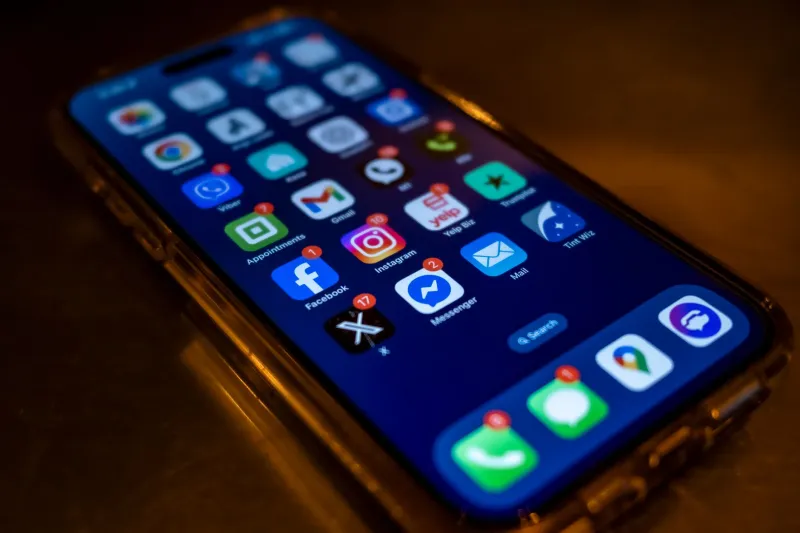
There was a time when a flashing red badge on your phone screen reliably signaled something that demanded your immediate attention. Today, that same visual alarm might mean a streaming platform wants you to know a show you watched three years ago has a new season. The signal has been diluted, and the consequences for your digital security are more serious than most users appreciate.
The Arms Race Begins in the Notification Tray
Over the past decade, app developers and product designers have drawn heavily from behavioral psychology to maximize engagement metrics. Techniques once confined to academic literature—variable reward schedules, loss aversion triggers, artificial scarcity signals—are now embedded in the notification architecture of some of the most widely used platforms in the United States.
The mechanics are familiar even if the vocabulary is not. A red numeral badge creates what psychologists call an "open loop," a cognitive itch the brain is wired to scratch. A countdown timer on a limited-time offer activates loss aversion, the well-documented human tendency to fear losing something more intensely than we desire gaining something equivalent. A push notification framed as "Your account requires attention" mimics the language of a security alert without technically constituting one.
These are not accidental design choices. They are deliberate, A/B-tested features optimized to produce a single behavioral outcome: the tap.
When Engagement Design Meets Security Design
The problem that emerges at the intersection of engagement engineering and security communication is one of signal degradation. Security researchers and usability experts have a term for it: alert fatigue. When every app in a user's ecosystem cries wolf at roughly the same decibel level, the genuine wolf eventually sounds identical to the noise.
Consider the anatomy of a phishing notification. A malicious actor sends a push alert that reads: "Unusual sign-in detected. Verify your identity immediately to protect your account." The visual presentation—a red icon, urgent phrasing, a call to action—is functionally indistinguishable from the notification design patterns that legitimate banking and social media apps have normalized over years of aggressive engagement optimization.
The attacker did not invent this template. They borrowed it from the mainstream app ecosystem, where identical urgency cues are deployed dozens of times per day for purposes ranging from genuinely important account alerts to reminders that a shopping cart is "almost sold out."
Dark Patterns Have Entered the Corporate Mainstream
The term "dark patterns" was coined by UX designer Harry Brignull in 2010 to describe interface tricks designed to manipulate users into actions they would not otherwise choose. What began as a critique of fringe or predatory software has since become a documented feature of mainstream consumer applications.
The Federal Trade Commission has taken notice. In recent years, the agency has published reports specifically addressing manipulative design in subscription services and digital platforms, and enforcement actions against companies employing deceptive interface tactics have increased. Several states, including California under its Consumer Privacy Act framework, have moved to codify prohibitions against certain dark patterns in privacy consent flows.
Yet regulation has moved considerably slower than product development. In the gap between legislative intent and enforcement reality, millions of users continue to be conditioned by apps that deploy urgency, guilt, and social proof as routine engagement tools.
Phantom Vibrations and the Neurological Footprint of Notification Culture
The conditioning runs deeper than conscious recognition. Researchers studying smartphone behavior have documented a phenomenon known as phantom vibration syndrome, in which users perceive their device vibrating when it is not. Studies suggest this experience is reported by a significant majority of heavy smartphone users. It is, in effect, the nervous system internalizing the notification loop so thoroughly that the brain begins generating the signal independently.
This neurological imprint matters to security because it speaks to the degree of automation with which users now respond to notification stimuli. When the tap becomes reflexive rather than deliberate, the cognitive evaluation that might catch a phishing attempt is bypassed entirely. The attacker who understands this dynamic is not exploiting a technical vulnerability. They are exploiting a behavioral one that mainstream app culture spent years creating.
Protecting Yourself Against the Noise
Restoring the signal-to-noise ratio in your notification environment is both a usability improvement and a genuine security measure. The following practices are worth implementing deliberately.
Conduct a notification audit. On both iOS and Android, the notification settings menu provides a comprehensive list of every application with permission to alert you. Most users, if they review this list honestly, will find dozens of apps with notification access that serve no legitimate security or communication purpose. Revoke access liberally.
Establish a visual hierarchy. Reserve the highest-urgency notification presentation—persistent banners, sound alerts, lock-screen display—for a small category of applications that have an actual security function: your banking app, your primary email client, your authenticator app. Demote everything else to silent badge-only delivery or disable notifications entirely.
Pause before tapping. This is the simplest and most consistently effective countermeasure. When a notification arrives framed in urgent language, treat the urgency itself as a reason to slow down rather than speed up. Navigate directly to the application through your app library rather than following a notification link. Legitimate security alerts will still be there. Phishing windows often will not survive the delay.
Distinguish time pressure from genuine urgency. A countdown timer on a retail promotion is a manufactured scarcity signal. A notification that your bank has detected an unrecognized device login is a genuine security event. Training yourself to categorize urgency claims before acting on them is a skill that pays compounding dividends over time.
The Broader Implication
The notification arms race is not simply a story about annoying apps. It is a story about how the design decisions of legitimate, well-resourced technology companies create the environmental conditions that attackers exploit. When engagement engineers at major platforms normalize red badges, urgent language, and time-pressure mechanics, they are not acting maliciously. But the downstream effect on users' ability to identify genuine threats is measurable and serious.
Cybersecurity awareness campaigns have long emphasized the importance of skepticism toward unsolicited communications. That message becomes considerably harder to act on when the communications environment has been engineered, by trusted brands, to suppress skepticism and reward reflexive response. The attacker's most valuable tool in 2025 may not be a novel exploit. It may be the notification permission you granted two years ago to an app you barely use.